Plans
Personal for one person. Business and Corporate for companies that want one shared memory.
Personal
Free on one computer, or up to three.
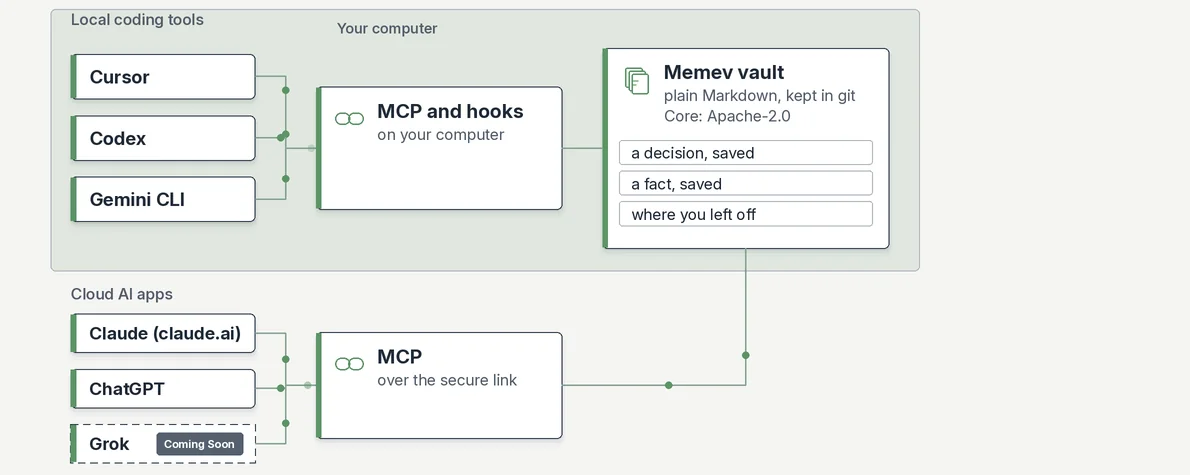
Free uses one computer at a time and moves between computers by restoring your own GitHub backup. Personal adds up to three computers with automatic merge for $12 a month or $120 a year (CHF 10 or CHF 100). A person can connect several cloud apps, such as Claude and ChatGPT.
Business
One company vault for all member work.
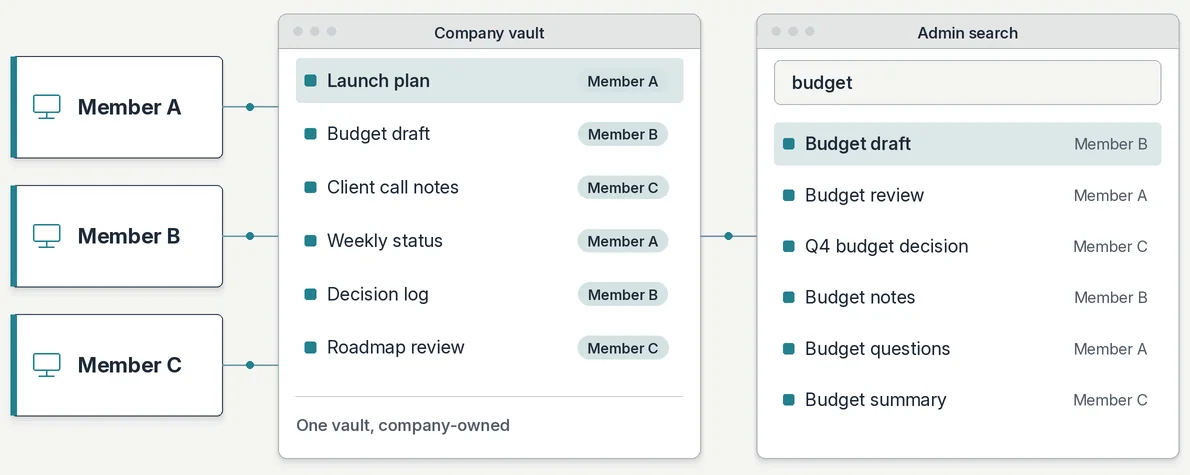
- All member work data lives in and syncs to one company vault. Owners and admins can see and search everything.
- Members get their own areas, and teams share areas. Members keep private work in their own systems.
- Only an org admin can invite members. When someone leaves, access ends, keys are revoked and the local cache is wiped within 24 hours (72 at the outside). Their area goes to a named person.
- Leadership, heads of department, PMO, Sales, Engineering and business development all work from the same vault.
- Departments and roles from your org chart, and sign-in with Google Workspace or Microsoft Entra ID, are planned. Planned
- The company vault connects to one AI provider that the company picks: a single cloud AI service or an LLM run on-premises.
Pricing: contact sales. The cloud trial is free.
Corporate
Business, with a pilot and private deployment.
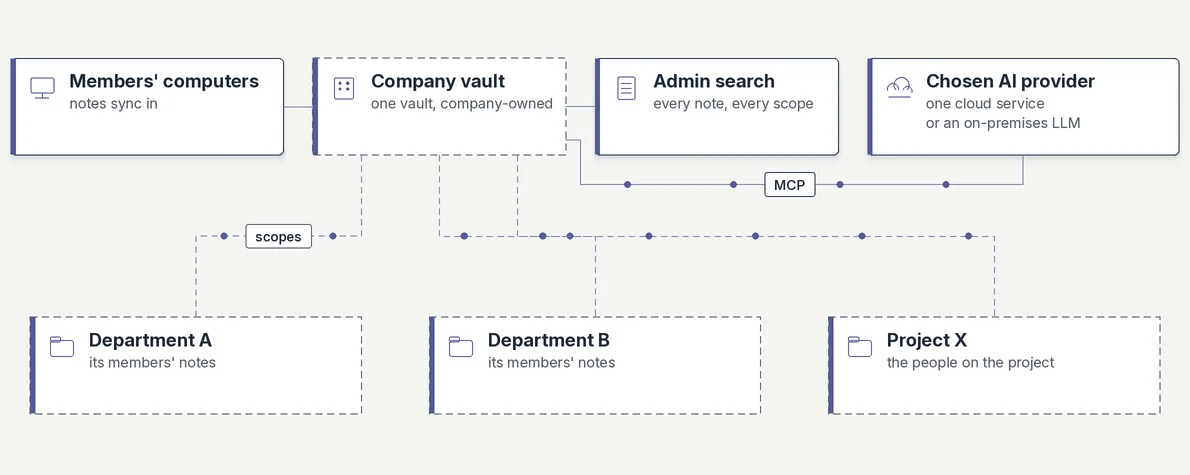
Corporate starts with a sales-assisted pilot sized with you. Like Business, it connects to one AI provider, cloud or on-premises LLM. An air-gapped on-premises package, identity sync, audit export, retention and legal hold, and failover hubs are planned. Planned Pricing: contact sales.
Deployment
Cloud-hosted or on-premises.
Cloud-hosted
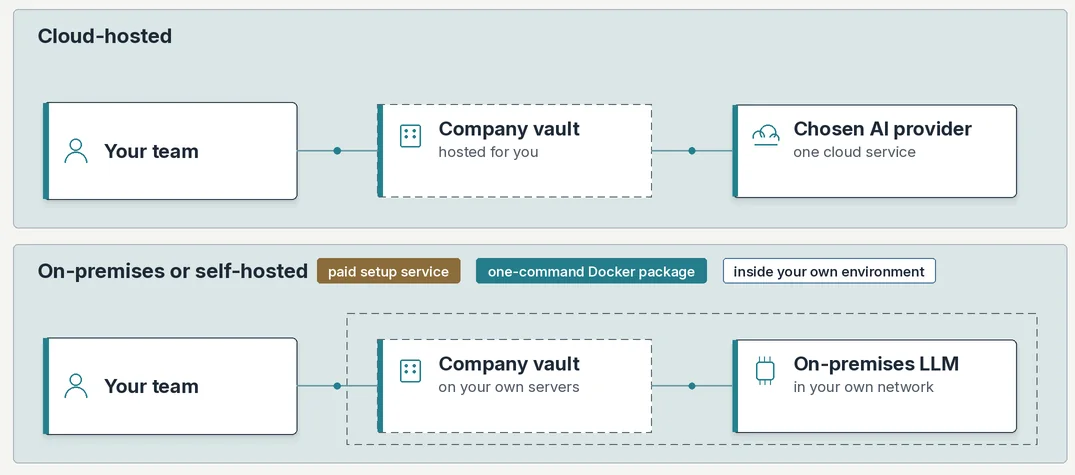
Optitransfer runs the hub for you, under a written agreement. It reads notes to index them. Backup goes to your own GitHub. Suits teams using one cloud AI service.
On-premises
Your IT team runs the hub, with our support. Notes stay on your server, on members’ computers and in your own git backup. Suits an on-premises LLM, an air-gapped network or strict data rules.
Memev doesn’t charge for or proxy model usage in either case. Your AI provider keeps its own model and key.
Connected apps
Personal connects several apps. Business and Corporate connect one provider.
Personal: local tools
Memev adds itself to each tool it finds, as an MCP server.
- Claude Code
- Codex
- Cursor
- Gemini CLI
- Claude Desktop
- VS Code
- Windsurf
- Zed
Personal: cloud AI apps
A person can connect several apps that take a remote MCP address, through a private secure link, each with its own credential.
- Claude
- ChatGPT
- Grok Coming Soon
Business and Corporate: one AI provider
The company picks one and connects its vault to it. Either a single cloud AI service, such as Claude or ChatGPT through MCP (Grok: Coming Soon), or an LLM run on-premises in your own network.
Cloud apps reach a personal vault through the secure link by default, and you can turn it off. A company vault starts with it off until an admin switches it on for its one provider.
Security
No telemetry, no cookies, plain files.
The Memev client sends no telemetry. This site sets no cookies. We don’t publish audit reports or attestations, because we haven’t published any yet. We can help with your security questionnaire.
Services
Custom modules, consultancy and setup.
Day rates on request. Remote setup is discounted. On-site setup adds flights and accommodation. Reports and modules for CRM, project tools and ticketing are planned. Planned
FAQ
Common questions.
Do you charge for model usage?
No. Memev doesn’t run, proxy or bill model usage. Your AI provider keeps its own model and key.
Can Business or Corporate connect several AI providers?
No. The company vault connects to one provider you pick: a single cloud AI service, such as Claude or ChatGPT through MCP, or an LLM run on-premises in your network. Personal can connect several cloud apps.
Where are our notes stored?
Notes are plain files in your vault, backed up to a private repository in your own GitHub. Cloud-hosted vaults run at Optitransfer under a written agreement. On-premises vaults stay on your server.
Can the company see everything members save?
Yes. All member work data lives in one company vault, and owners and admins can see and search all of it. Members keep private work in their own systems. We suggest you tell your staff what is shared before they connect.
When should we choose on-premises?
When you run an LLM on-premises, work on an air-gapped network or have strict rules on where data may sit. Those teams start with a sales-assisted pilot.